News

Product updates and announcements from the PIXELFALLS team.

  1. 23 Oct 2026
    PIXELFALLS 0.2.2 released

    Props removed (everything is a Node), intro tune, Solution Explorer and debugger polish, named collider queries, and pause on Lua errors.

    • Feature: PIXELFALLS very own intro tune on the game loading screen — tune by SquireZero.
    • Code Editor
      • Feature: Warnings when engine calls sit in the wrong lifecycle method (for example playTune belongs in update, not draw).
      • Update:Props removed, everything is now a Node. Hollow cube = no script (static); solid cube = has a script (dynamic) - Thanks TheLastRobot.
      • Update: Solution Explorer - Visual improvements.
      • Update: Solution Explorer - Double-clicking a node now opens the node settings.
      • Update: Solution Explorer - Hovering a node now shows a larger sprite preview.
      • Update: Solution Explorer - Lists folders first (A–Z), with main pinned at the top.
      • Feature: Node Editor - Nodes without a sprite can have an IDE/Level Editor only icon, to help identify triggers etc (not drawn in-game).
      • Update: Node Editor - UI polish, more consistent with other editors.
      • Update: Node Editor - Arrow keys to nudge colliders/origin
      • Update: Node Editor - Colliders/origin may sit outside the sprite bounds.
    • Level Editor
      • Feature: Classes with no sprite show their editor icon on the map and as the placement preview.
    • Debugger
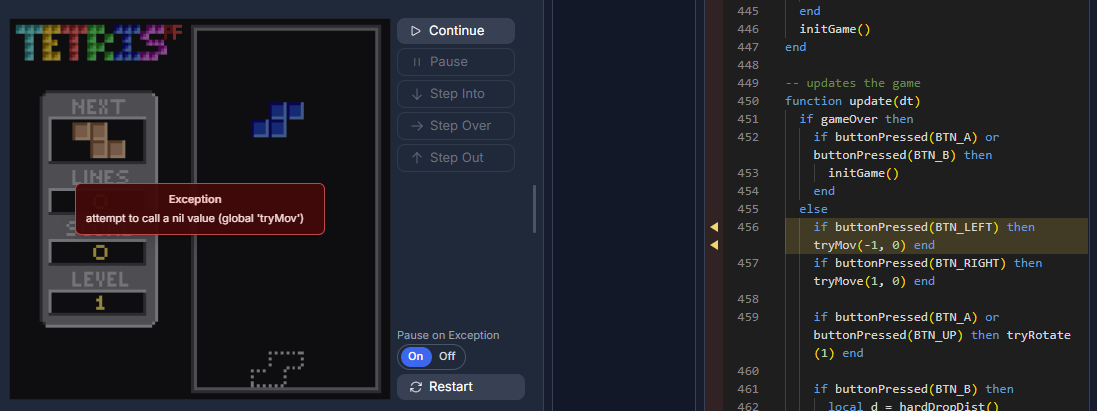
      • Feature: The debugger can pause on an uncaught Lua error
      • Update: Debug panel layout toggles for Call Stack/Watches and Locals/Globals.
      • Update: Add locals/globals to watches from the context menu.
    • Engine
      • Feature: Named collider queries — hasCollided / getCollidedEntities accept an optional collider id (e.g. self:hasCollided("feet", tag.wall)).
      • Feature:getCollidedPairs returns { selfCollider, other, otherCollider } for each overlap this frame.
    • Sprite Editor
      • Fix: Reduced memory usage when drawing sprites — thanks 8Bit Jellyfish.
  2. 12 Oct 2026
    PIXELFALLS 0.2.1 released

    Code Editor tab workflow improvements, node-to-prop confirmations, and engine performance work.

    • Update: Added Close All / Close Others buttons to the Solution Explorer file tabs.
      • Update: Files open as preview until edited or Keep Open is selected.
      • Update: Changing a node to a prop now prompts to confirm.
      • Update: Several engine performance improvements.
  3. 09 Oct 2026
    Release
    PIXELFALLS 0.2.0 released

    Multiple game resolutions, a new sound editor, and full debugging in the IDE.

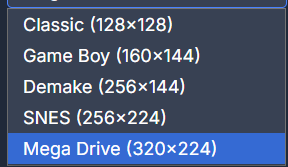
    • Feature: Multiple game resolutions added. Multiple Game Resolutions
      • Note: Games will likely not display correctly on play.pixelfalls.co.uk at the moment.
    • Feature: Big sound editor overhaul with a new timeline, tempo, and note editing.
      • Massive thanks to SquireZero for all his time, knowledge, and testing of this feature.
      • Feature: Tracks up to 3 minutes long.
      • Feature: Insert tracks into the timeline to create complex arrangements.
      • Feature: Live updates when editing notes.
      • Feature: Selection tools for notes.
      • Feature: Scope preview for easier note editing.
      • Feature:playSFX can loop a sound or play part of it. playSFX("Alarm", true) loops on any channel. playSFX("Jump", 2, false, 16, 24) plays from column 16 until column 24 on channel 2. Column 24 is not played.
      • Feature: Many more improvements.
    • Feature: Full debugging now available in the IDE.
      • Feature: Breakpoints can be set in the code editor.
      • Feature: Step through code execution.
      • Feature: View call stack, local variables, and global variables.
      • Feature: Watch expressions can be added to the debugger.
    • Feature: Sprite Editor — Hold Shift with the brush tool to draw a straight line.
    • Update: Play — Can now copy the console output to the clipboard (copy button added) — Thanks Pops.
    • Update: Sprite Palette — Tooltips now show the sprite index — Thanks SquireZero.
    • Update: Additional syntax analysis in the code editor.
    • Fix: Sprite Palette tile highlighting no longer lags — Thanks 8Bit Jellyfish.
    • Fix: Further fix for iPhone play controls causing text selection — Thanks 8Bit Jellyfish.
    • Fix: Lifecycle methods now work correctly with node instances — Thanks 8Bit Jellyfish.
    • Fix: Save As now correctly updates the Game Title — Thanks 8Bit Jellyfish.
    • Fix:setPaletteRemap now correctly swaps colours on a sprite — Thanks SquireZero.
    • Fix: A custom node destroy method was preventing the node from being removed in the engine — Thanks TheLastRobot.
    • Fix:drawFillCircle now draws a circle — Thanks SquireZero.
  4. 20 Sep 2026
    PIXELFALLS 0.1.6 released

    Sprite preview backgrounds, sheet export, fill-beyond-tile, and several play/IDE fixes.

    • Feature: Sprite Editor - Preview background colour added to the Sprite Canvas and Sprite Palette.
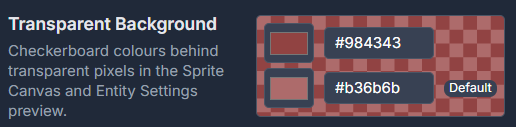
    • Feature: Change chequerboard background colours in IDE settings
    • Feature: Sprite Editor - Export Sprite Sheets as PNG files — Thanks SquireZero.
    • Update: Sprite Editor Fill Tool - Hold Shift to fill beyond the 8x8 tile boundary.
    • Update: Added non-destructive paid-to-free tier clamping — Thanks Carl - Ukiyo.
    • Fix: iPhone mobile play controls should no longer cause text selection.
    • Fix: Collision Tags no longer persist between carts — Thanks 8Bit Jellyfish.
    • Fix: Code Editor should correctly reset between cart loads/new games — Thanks 8Bit Jellyfish.
    • Fix: Issue where UI states were saved in cart, resulting in an "unsaved changes" warning when just navigating.
    • Fix: Pause menu now correctly pauses everything — Thanks SquireZero.
    • Fix: Play View area now correctly resizes when it does not fit the screen — Thanks 8Bit Jellyfish.
  5. 18 Sep 2026
    Game Jam
    First PIXELFALLS Game Jam winners

    Congratulations to the winners of Best Gameplay, Best Visuals, Best Sound, and Most Creative.

    The first PIXELFALLS Game Jam wrapped up in September 2026 — thanks to everyone who took part.

    See all four winning games, judge comments, and play links on the Game Jam page.

  6. 12 Sep 2026
    PIXELFALLS 0.1.5 released

    screenWidth/screenHeight, Play Restart, and Level Editor node tooling improvements.

    • Feature: API - Added screenWidth() and screenHeight() functions to get the width and height of the viewport — Thanks Carl - Ukiyo.
    • Feature: UI - Added Restart button to the play page — Thanks Carl - Ukiyo.
    • Update: Added variable scope documentation to the docs — Thanks TheLastRobot.
    • Update: Eraser tool in the Level Editor can now erase nodes — Thanks 8Bit Jellyfish.
    • Update: Tile only tools are now disabled on node layers in the Level Editor.
    • Update: Added cursor over node visual indicator in the Level Editor.
    • Update: Added Ghost node visual indicator under the cursor when adding a node to a node layer.
    • Update: Removed unnecessary .lua extension and prefix path when creating a new node or prop.
    • Fix: Sprite Palette - Multi-select visual indicator now persisting — Thanks 8Bit Jellyfish.
  7. 5–6 Sep 2026
    Event
    First public outing — Brighton & Hove Comic Con

    Two packed days at Brighton Dome with prototype hardware, demos, and plenty of “where can I buy this?”

    PIXELFALLS made its first public appearance at Brighton & Hove Comic Con (5–6 September 2026).

    For two days the stand barely went quiet — chatting with visitors, running demos on the prototype hardware, and handing around early cartridges. Many people asked where they could buy the console and games, even though it’s still a very early prototype. Surreal, and hugely motivating.

    Thanks to everyone who stopped by, played a round, or stuck around for a longer chat.

  8. 28 Aug 2026
    PIXELFALLS 0.1.4 released

    In-game CONTROLS remapping, menu polish, and time()/gameTime() APIs.

    • Feature: In-game CONTROLS mapping menu added (pause → CONTROLS) to remap keyboard and gamepad buttons for all logical BTN_* inputs.
      • Bindings save in the browser and apply across every game on that device.
    • Update: UX improvement to the menu system to make it more consistent and easier to use.
    • Update: Quit option removed as it had no functionality.
    • Fix: Fixed bug where Restart did nothing.
    • Feature:time() / t() — returns seconds since the game booted; continues when the menu is open.
    • Feature:gameTime() — returns seconds since the game started; pauses when the menu is open.
  9. 22 Aug 2026
    PIXELFALLS 0.1.3 released

    Big overhaul of Sprite Editor paste, plus Level Editor node-layer undo fix.

    Overhaul of the Sprite Editor Paste functionality.

    • Update: Sprite Editors - Big overhaul of paste functionality — Thanks TheLastRobot.
      • Pasted selections stay floating until you press Enter or click outside. Escape cancels a paste.
      • Can now paste from system clipboard or sprite editor.
      • Resize with corner and edge handles (hold Shift to keep the aspect ratio).
      • Choice of resizing algorithm when resizing.
    • Fix: Sprite Editor - Fixed bug where pasting a selection would cause transparent pixels to change colour during selection.
    • Fix: Level Editor - Undo was not working on the node layers.
  10. 17 Aug 2026
    PIXELFALLS 0.1.2 released

    Fix: can now draw in all sprite rows.

    • Fix: Can now draw in all sprite rows.
  11. 14 Aug 2026
    PIXELFALLS 0.1.1 released

    Gamepad support, multiple sprite sheets, and several editor and billing fixes.

    • Feature: Gamepad support added. Keyboard and standard controllers both drive the same BTN_* buttons (D-pad or left stick, A/B/X/Y, shoulders).
      • Start opens the pause menu, the same as Escape.
    • Feature: Multiple sprite sheets. Each sheet is now fixed at 16 columns × 16 rows (256 sprites).
      • Paid plans can have up to 8 sprite sheets (2048 sprites).
      • Free Tier has 1 sheet (256 sprites).
      • drawSprite still uses global 1-based IDs (sheet 0 is 1–256, sheet 1 is 257–512, and so on).
      • Existing carts load as they did before; extra-tall sheets split into 16-row chunks.
      • Fix: This should resolve the performance issues seen with excessive number of rows — Thanks AndyH.
    • Update: Added confirmations to Switch Tier modal — Thanks AndyH.
    • Update: Added confirmation statement about feature limits when switching to Free Tier.
    • Update: Documentation now returns to last page and position when navigating back to it — Thanks AndyH.
    • Fix: Resolving payment after past-due now restores the tier paid for — Thanks Garlic Bread Boi.
    • Fix: Added a generous map size limit to prevent crashes — Thanks AndyH.
      • Paid maps are limited to 65,536 tiles (for example 4096×16 or 256×256).
      • Optimised editor performance by only painting the visible area, so very wide maps no longer crash or show a blank canvas.
      • New maps now start with a default size of 16×16.
    • Fix:print() now uses Lua __tostring and default type formatting, so class instances and tables no longer show as <value> — Thanks TheLastRobot.
    • Fix: Code editor no longer flags tables made callable with __call as undefined functions.
  12. 11 Aug 2026
    Release
    PIXELFALLS 0.1.0 — First Public Release (Alpha)

    Our first official release — jump in, make something weird, and share it with the world.

    PIXELFALLS is here — our first official release!

    Please note that this is an alpha release and there may be bugs and performance issues, but it is a great way to get started with PIXELFALLS and help shape the future of the platform.

    Jump in, make something weird, and share it with the world.

  13. 8 Aug 2026
    PIXELFALLS 0.0.15 – 0.0.18 released

    Since 0.0.14 I have shipped game sharing, remapped controls, and several account and console improvements.

    v0.0.18

    • Feature: Delete account option added to Account Settings
    • Fix: Removed unnecessary URL calls when logging in
    • Update: Cleaner Console Log: only user print() and errors will be logged to the console by default.

    v0.0.17

    • Feature: Share Game; branded QR code for the play link.

    v0.0.16

    • Update: Additional game buttons added and remapped (BTN_UP/DOWN/LEFT/RIGHT, BTN_A–BTN_D, BTN_L/BTN_R). Games poll buttonDown/buttonPressed with these IDs; default keyboard binds are Z/X/A/S/Q/W + arrows. Existing carts migrate KEY_Z→BTN_A, KEY_X→BTN_B, KEY_M→BTN_C, and direction KEY_*→BTN_* on load.
    • Update: Mobile Virtual Pad layout improved for better touch interaction.

    v0.0.15

    • Feature: Share Game; share your game with the world.
  14. 4 Jul 2026
    PIXELFALLS 0.0.11 – 0.0.14 released

    Since 0.0.10 I have shipped the SFX Editor, engine audio playback, and several editor improvements.

    v0.0.14

    • Feature: SFX Editor; playSFX() function now working in the engine.
    • Feature: SFX Editor; playSFX() support sound name as a string parameter instead of index. playSFX("jump")
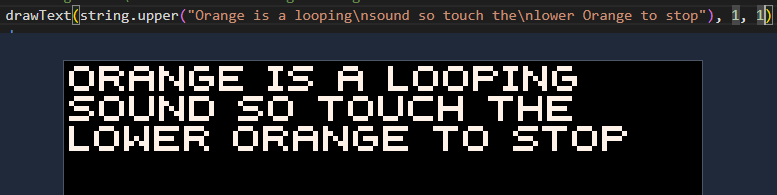
    • Update: Engine; drawText now supports \n in the text string to start a new line.
    • Fix: Fixed ticket #35 - Bleed through when using Show Colliders in Play mode.
    • Fix: Fixed ticket #42 - Game instructions are not updated when changing between carts
    • Fix: Fixed ticket #39 - Editor switching Tabs loses position

    v0.0.13

    • Update: SFX Editor; Removed multi column note style change
    • Update: SFX Editor; Mouse cursor row and column highlighting.
    • Update: App wide; removed browser default context menu.

    v0.0.12

    • Update: More changes to the SFX Editor

    v0.0.11

    • Feature: SFX editor added to the IDE
    • Feature: Code Editor; spotlight appears when switching back to a code tab. Can be turned off in IDE Settings.
    • Fix: Code Editor; Cursor and Scroll position of each tab now remembered.
    • Update: Solution Explorer; Folder and File context menus now use PF modal prompts.
    • Update: Solution Explorer; Folder state now remembered and expanded/collapsed.
    • Update: Solution Explorer; Right Click Context Menu added for Folder and File.
    • Update: Solution Explorer; UX improvement by simplifying solution explorer items.
    • Update: Solution Explorer is now resizeable.
  15. 18 May 2026
    PIXELFALLS 0.0.10 released

    Subscriptions, cloud saves, Home redesign, Level Editor viewport overlay, and palette layout improvements.

    This release adds subscriptions, cloud saves, and a redesigned Home page experience.

    • Feature: Subscription integration with Stripe (Free, Creator, Benefactor, and invite-only Founder).
    • Feature: Cloud storage for game carts — save, load, and manage projects from Home → Projects.
    • Feature: Font trim options added to Game Settings.
    • Feature: New viewport overlay in the Level Editor to help level design within the game screen bounds.
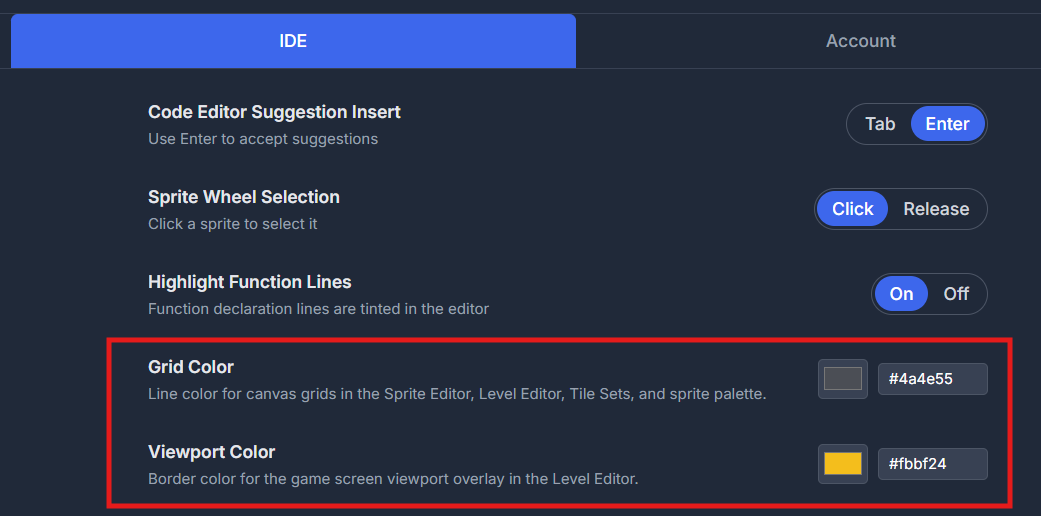
    • Feature: Customizable grid and viewport color in Home → IDE — one setting for all grids.
    • Update: Home section added for Projects, IDE, Account, and About (Settings merged into Home).
    • Update: Styling updated for consistency across the app.
    • Update: Improved Node and Prop Palette to show more items and improved layout.
    • See changelog for more details.
  16. 8 May 2026
    PIXELFALLS 0.0.9 released

    This release continues to improve the editor and docs experience as we move toward the first public release.

    • Tags are now enums for easier use in code and suggestions in the code editor.
    • Games Settings UI improvements.
    • Function names are now background highlighted for easier visual scanning (toggling on/off in settings > IDE)
    • Fixed many issues with collisions and collisions-related APIs.
    • New runtime APIs for loading and unloading map entities and layers.
    • New runtime API for saving and loading engine checkpoints.
    • See changelog for more details.
  17. 8 May 2026
    Website update: Roadmap + News page

    We have updated the website with a dedicated Roadmap page and this new News page.

    The roadmap now gives a clearer view of what is complete, what is in progress, and what is planned next.