Change Log - What's new?
23 Oct 2026
v0.2.2
- Feature: PIXELFALLS very own intro tune on the game loading screen — tune by SquireZero.
- Code Editor
- Feature: Warnings when engine calls sit in the wrong lifecycle method (for example
playTunebelongs inupdate, notdraw). - Update:Props removed, everything is now a Node. Hollow cube = no script (static); solid cube = has a script (dynamic) - Thanks TheLastRobot.
- Update: Solution Explorer - Visual improvements.
- Update: Solution Explorer - Double-clicking a node now opens the node settings.
- Update: Solution Explorer - Hovering a node now shows a larger sprite preview.
- Update: Solution Explorer - Lists folders first (A–Z), with
mainpinned at the top. - Feature: Node Editor - Nodes without a sprite can have an IDE/Level Editor only icon, to help identify triggers etc (not drawn in-game).
- Update: Node Editor - UI polish, more consistent with other editors.
- Update: Node Editor - Arrow keys to nudge colliders/origin
- Update: Node Editor - Colliders/origin may sit outside the sprite bounds.
- Feature: Warnings when engine calls sit in the wrong lifecycle method (for example
- Level Editor
- Feature: Classes with no sprite show their editor icon on the map and as the placement preview.
- Debugger
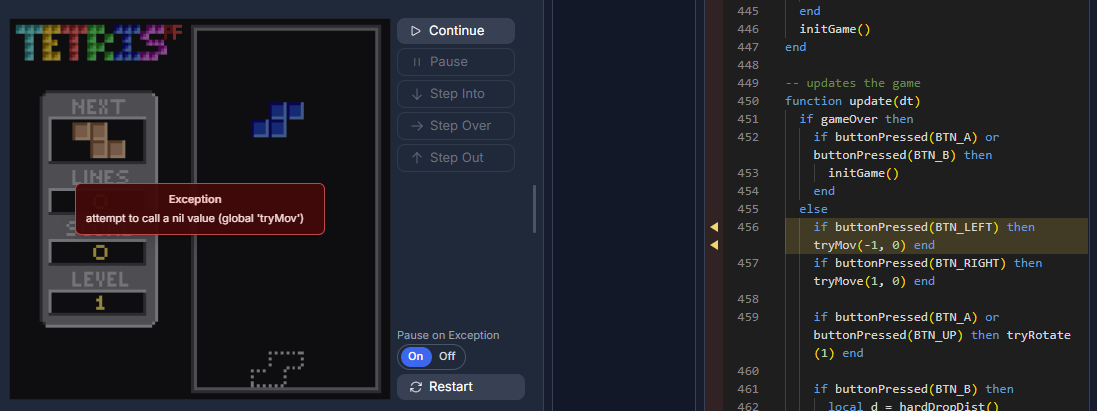
- Feature: The debugger can pause on an uncaught Lua error
- Update: Debug panel layout toggles for Call Stack/Watches and Locals/Globals.
- Update: Add locals/globals to watches from the context menu.
- Engine
- Feature: Named collider queries —
hasCollided/getCollidedEntitiesaccept an optional collider id (e.g.self:hasCollided("feet", tag.wall)). - Feature:
getCollidedPairsreturns{ selfCollider, other, otherCollider }for each overlap this frame.
- Feature: Named collider queries —
- Sprite Editor
- Fix: Reduced memory usage when drawing sprites — thanks 8Bit Jellyfish.
12 Oct 2026
v0.2.1
- Code Editor
- Update: Added Close All/Close Others buttons to the Solution Explorer file tabs.
- Update: Files open as preview, until edited or 'Keep Open' is selected.
- Update: Nodes changes to props, now prompts to confirm.
- Engine
- Update: Several performance improvements.
09 Oct 2026
v0.2.0
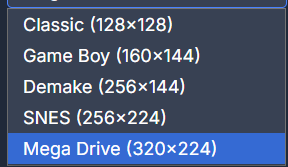
Big Update! Multiple game resolutions, a new sound editor, and full debugging in the IDE.
- Feature: Multiple game resolutions added.
- Note: Games will likely not display correctly on play.pixelfalls.co.uk at the moment.
- Feature: Big sound editor overhaul with a new timeline, tempo, and note editing.
- Massive thanks to SquireZero for all his time, knowledge, and testing of this feature.
- Feature: Tracks up to 3 minutes long.
- Feature: Insert tracks into the timeline to create complex arrangements.
- Feature: Live updates when editing notes.
- Feature: Selection tools for notes.
- Feature: Scope preview for easier note editing.
- Feature:
playSFXcan loop a sound or play part of it.playSFX("Alarm", true)loops on any channel.playSFX("Jump", 2, false, 16, 24)plays from column 16 until column 24 on channel 2. Column 24 is not played. - Feature: Many more improvements.
- Feature: Full debugging now available in the IDE.
- Feature: Breakpoints can be set in the code editor.
- Feature: Step through code execution.
- Feature: View call stack, local variables, and global variables.
- Feature: Watch expressions can be added to the debugger.
- Feature: Sprite Editor - Hold Shift with the brush tool to draw a straight line.
- Update: Play - Can now copy the console output to the clipboard (copy button added) - Thanks Pops.
- Update: Sprite Palette - Tooltips now show the sprite index - Thanks SquireZero.
- Update: Additional syntax analysis in the code editor.
- Fix: Sprite Palette tile highlighting no longer lags - Thanks 8Bit Jellyfish.
- Fix: Further fix for iPhone play controls causing text selection - Thanks 8Bit Jellyfish.
- Fix: Lifecycle methods now work correctly with node instances - Thanks 8Bit Jellyfish.
- Fix: Save As now correctly updates the Game Title - Thanks 8Bit Jellyfish.
- Fix:
setPaletteRemapnow correctly swaps colours on a sprite - Thanks SquireZero. - Fix: A custom node
destroymethod was preventing the node from being removed in the engine - Thanks TheLastRobot. - Fix:
drawFillCirclenow draws a circle - Thanks SquireZero.
20 Sep 2026
v0.1.6
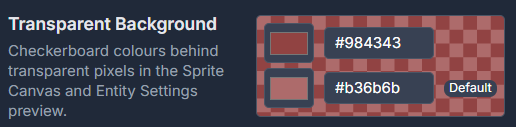
- Feature: Sprite Editor - Preview background colour added to the Sprite Canvas and Sprite Palette.
- Feature: Change chequerboard background colours in IDE settings
- Feature: Sprite Editor - Export Sprite Sheets as PNG files - Thanks SquireZero.
- Update: Sprite Editor Fill Tool - Hold Shift to fill beyond the 8x8 tile boundary.
- Update: Added non-destructive paid-to-free tier clamping - Thanks Carl - Ukiyo.
- Fix: iPhone mobile play controls should no longer cause text selection.
- Fix: Collision Tags no longer persist between carts - Thanks 8Bit Jellyfish.
- Fix: Code Editor should correctly reset between cart loads/new games - Thanks 8Bit Jellyfish.
- Fix: Issue where UI states were saved in cart, resulting in an "unsaved changes" warning when just navigating.
- Fix: Pause menu now correctly pauses everything - Thanks SquireZero.
- Fix: Play View area now correctly resizes when it does not fit the screen - Thanks 8Bit Jellyfish.
- Fix: Select Sprite missing from Node Settings modal - Thanks 8Bit Jellyfish.
- Fix: Node Settings modal now checks for duplicate node names and Cancel button ignores changes.
- Fix: Changing from Node to Prop caused incorrect sprite selection.
12 Sep 2026
v0.1.5
- Feature: API - Added screenWidth() and screenHeight() functions to get the width and height of the viewport - Thanks Carl - Ukiyo.
- Feature: UI - Added Restart button to the play page - Thanks Carl - Ukiyo.
- Update: Added variable scope documentation to the docs - Thanks TheLastRobot.
- Update: Eraser tool in the Level Editor can now erase nodes - Thanks 8Bit Jellyfish.
- Update: Tile only tools, are now disabled on node layers in the Level Editor.
- Update: Added cursor over node visual indicator in the Level Editor.
- Update: Added Ghost node visual indicator under the cursor when adding a node to a node layer.
- Update: Removed unnecessary .lua extension and prefix path when creating a new node or prop.
- Fix: Sprite Palette - Multi-select visual indicator now persisting - Thanks 8Bit Jellyfish.
28 Aug 2026
v0.1.4
- Feature: In-game CONTROLS mapping menu added (pause → CONTROLS) to remap keyboard and gamepad buttons for all logical
BTN_*inputs.- Bindings save in the browser and apply across every game on that device.
- Update: UX improvement to the menu system to make it more consistent and easier to use.
- Update: Quit option removed as it had no functionality.
- Fix: Fixed bug where Restart did nothing.
- Feature:
time()/t()— returns seconds since the game booted - continues when the menu is open. - Feature:
gameTime()— returns seconds since the game started - pauses when the menu is open.
22 Aug 2026
v0.1.3
Overhaul of the Sprite Editor Paste functionality.
- Update: Sprite Editors - Big overhaul of paste functionality - Thanks TheLastRobot.
- Update: Sprite Editor - Pasted and selections stay floating until you press Enter or click outside. Escape cancels a paste.
- Update: Sprite Editor - Can now paste from system clipboard or sprite editor.
- Update: Sprite Editor - Resize with corner and edge handles (hold Shift to keep the aspect ratio).
- Update: Sprite Editor - Choice of resizing algorithm when resizing.
- Fix: Sprite Editor - Fixed bug where pasting a selection from the sprite editor would cause transparent pixels to change colour during selection.
- Fix: Level Editor - Undo was not working on the node layers.
17 Aug 2026
v0.1.2
- Fix: Can now draw in all sprite rows
14 Aug 2026
v0.1.1
Gamepad support, multiple sprite sheets, and several editor and billing fixes.
- Feature: Gamepad support added. Keyboard and standard controllers both drive the same
BTN_*buttons (D-pad or left stick, A/B/X/Y, shoulders).- Start opens the pause menu, the same as Escape.
- Feature: Multiple sprite sheets. Each sheet is now fixed at 16 columns × 16 rows (256 sprites).
- Paid plans can have up to 8 sprite sheets (2048 sprites).
- Free Tier has 1 sheet (256 sprites).
drawSpritestill uses global 1-based IDs (sheet 0 is 1–256, sheet 1 is 257–512, and so on).- Existing carts load as they did before; extra-tall sheets split into 16-row chunks.
- Fix: This should resolve the performance issues seen with excessive number of rows - Thanks AndyH.
- Update: Added confirmations to Switch Tier modal - Thanks AndyH.
- Update: Added confirmation statement about feature limits when switching to Free Tier.
- Update: Documentation now returns to last page and position when navigating back to it - Thanks AndyH.
- Fix: Resolving payment after past-due, now restores tier paid for - Thanks Garlic Bread Boi.
- Fix: Added, very generous map, size limit to prevent crashes - Thanks AndyH.
- Paid maps are limited to 65,536 tiles (for example 4096×16 or 256×256)
- Optimised editor performance by only painting the visible area, so very wide maps no longer crash or show a blank canvas.
- New maps now start with default size of 16×16.
- Fix:
print()now uses Lua__tostringand default type formatting, so class instances and tables no longer show as<value>- Thanks TheLastRobot. - Fix: Code editor no longer flags tables made callable with
__callas undefined functions.
11 Aug 2026
v0.1.0

PIXELFALLS is here — our first official release!
Jump in, make something weird, and share it with the world.
v0.0.18
- Feature: Delete account option added to Account Settings
- Fix: Removed unnecessary URL calls when logging in
- Update: Cleaner Console Log: Only user
print()and errors will be logged to the console by default.
v0.0.17
- Feature: Share Game; branded QR code for the play link.
v0.0.16
- Update: Additional game buttons added and remapped (
BTN_UP/DOWN/LEFT/RIGHT,BTN_A–BTN_D,BTN_L/BTN_R). Games pollbuttonDown/buttonPressedwith these IDs; default keyboard binds are Z/X/A/S/Q/W + arrows. Existing carts migrateKEY_Z→BTN_A,KEY_X→BTN_B,KEY_M→BTN_C, and directionKEY_*→BTN_*on load. - Update: Mobile Virtual Pad layout improved for better touch interaction.
v0.0.15
- Feature: Share Game; Share your game with the world.
v0.0.14
- Feature: SFX Editor; playSFX() function now working in the engine.
- Feature: SFX Editor; playSFX() support sound name as a string parameter instead of index.
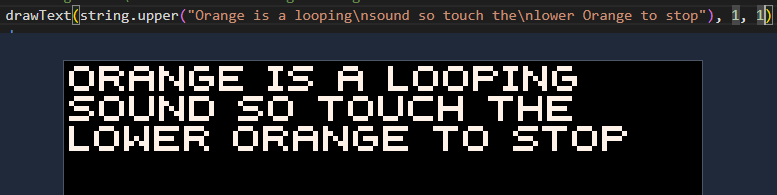
playSFX("jump") - Update: Engine;
drawTextnow supports\nin the text string to start a new line. - Fix: Fixed ticket #35 - Bleed through when using Show Colliders in Play mode.
- Fix: Fixed ticket #42 - Game instructions are not updated when changing between carts
- Fix: Fixed ticket #39 - Editor switching Tabs loses position
v0.0.13
- Update: SFX Editor; Removed multi column note style change
- Update: SFX Editor; Mouse cursor row and column highlighting.
- Update: App wide; removed browser default context menu.
v0.0.12
- Update: More changes to the SFX Editor
v0.0.11
- Feature: SFX editor added to the IDE
- Feature: Code Editor; spotlight appears when switching back to a code tab. Can be turned off in IDE Settings.
- Fix: Code Editor; Cursor and Scroll position of each tab now remembered.
- Update: Solution Explorer; Folder and File context menus now use PF modal prompts.
- Update: Solution Explorer; Folder state now remembered and expanded/collapsed.
- Update: Solution Explorer; Right Click Context Menu added for Folder and File.
- Update: Solution Explorer; UX improvement by simplifying solution explorer items.
- Update: Solution Explorer is now resizeable.
v0.0.10
- Feature: Subscription integration with Stripe
- Feature: Cloud storage integration
- Feature: Font trim options added to Game Settings
- Feature: New viewport overlay in the Level Editor to help level design within the game screen bounds
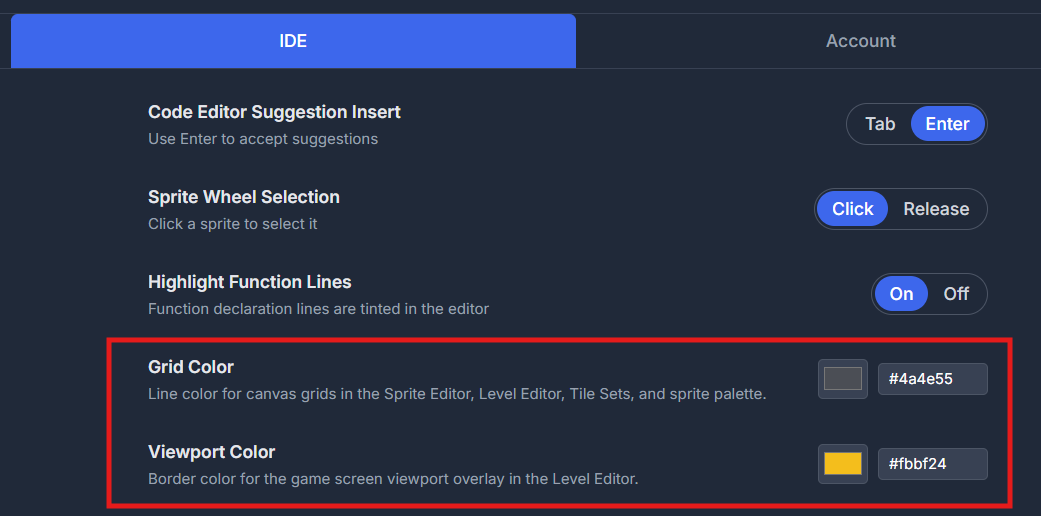
- Feature: Customizable grid and viewport color in Home → IDE — one setting for all grids
- Update: Home section added for Projects, IDE, Account, and About (Therefore removed Settings section)
- Update: Styling updated for consistency across the app.
- Update: Tidy up of NavBar lower buttons.
- Update: Improved code suggestions with Node method referencing.
- Update: Added collidersEnabled(boolean) function to nodes.
- Update: Added Changelog images and GIFs support.
- Update: Improved Node and Prop Palette to show more items and improved layout
- Fix: Enhanced code suggestions with Node method referencing and properties.
- Fix: Code spawned node instances now have colliders
- Fix: Font now has complete character set
- Fix: Local/Cloud timestamp check performed to ensure use is in sync with the latest changes.
v0.0.9
IDE
- Fix: Sprite editor now correctly renders palette color index
0as the default background color..0 - Feature: Tags are now enums. Add/Remove tags in Game Settings, then use them in code by typing tag. and it will list available tags.
- Update: After confirming Start New Game, the IDE now automatically switches to Game Settings.
- Update: Cleaned up the Node Settings modal.
- Update: Improved Level Editor Collider Show visuals
- Fix: Map node/prop
visiblenow only affects rendering. Collision participation now depends onenabled, so invisible-but-enabled instances still collide. - Feature:Collide checkbox on map node/prop instances (
enableCollisions, default on): turn off to exclude a placement fromhasCollided*while keeping it enabled and visible. - Update: Clean up and styling update to Game Settings screen
- Feature: Multiple selected entities can now be move/copied/pasted/delete together.
- Feature: Function names are background highlighted for easier visual scanning (togging on/off in settings > IDE)
API
- Feature:
buttonDown()andbuttonPressed()now support no-argument calls to query whether any tracked key is currently held or was pressed this frame. - Update: Map-node collision participation uses
enabledand per-instanceenableCollisions(default true).visiblecontrols rendering only. - Feature:
getAllEntities(tag)returns live instances with overloads for no arg (all), type query (path/class/instance), and tag id (e.g.tag.wall). - Feature: Added built-in global
statetable as a shared data namespace betweenmain.luaand nodes/props. - Fix: DrawText now correctly uses the setColor value if drawText colour parameter is omitted. Ticket #20
- Feature: Added runtime map-entity loading APIs:
loadMapEntities(mapIndex),loadMapLayerEntities(mapIndex, layerIndexOrName),unloadMapEntities, andunloadMapLayerEntities— always restart-style (reset engine entities and tiles for that scope, then spawn). - Feature: Default behaviour to loadMapEntities(0) automatically on first run can be turned off in Game Settings:
Auto-load first map entities on startup - Feature:
saveSnapshot([replaceSnapshotId]),loadSnapshot(snapshotId),deleteSnapshot(snapshotId)— engine checkpoints for the current logical level (tracks lastloadMapEntities/loadMapLayerEntities); console logs approximate snapshot sizes.
v0.0.8
API
- Feature:
instance:getCollidedEntities()orgetCollidedEntities(instance)— for a node placed on the map, returns a list of the other instances overlapping it this frame (pickups, doors, hazards, etc.). See the collision docs for examples. - Feature:
instance:isType(NodeName)orisType(instance, NodeName)- Check if an instances if of a type.
IDE — Creating classes
- Update:New Node (+N) and New Prop (+P) in Solution Explorer now open the full Create Node / Create Prop dialog.
- Feature: Creating a node or prop class prevents create if the name would clash with an existing node or prop type.
IDE — Sprite & level editors
- Feature:Eyedropper tool in the Sprite Editor (shortcut I or Right-Click anytime) to sample pixels from the sheet.
- Update: Draw tool hover tips use a clearer label + shortcut style.
v0.0.7
Engine
- Update:30 FPS is now game default, option to change to 60 in game settings. Older carts will be set to 60 FPS to run as they were.
- Update: Delta time now passed to
update(dt). Existing carts that useupdate()with no args are unchanged. - Update: Fixed issue with just a few nodes causing slowdown.
IDE
- Update: Added FPS stats current / min / max / Avg30s when playing the game.
- Update:Loading Game screen while game loads
v0.0.6
** Switch a node to a prop and visa versa has not been tested - suggest avoid doing this for now **
API
- Fix: Renamed 'mapGetTile' to 'getMapTile' and added level and layer index to parameters.
- API is now 'getMapTile(levelIndex, layerIndex, tileX, tileY)'
- Feature: Added 'setMapTile(levelIndex, layerIndex, tileX, tileY, spriteIndex)'
- Feature: Initial work for collisions with the following APIs
- 'hasCollided(instance, instance)'
- 'hasCollided(tag, instance)'
- 'hasCollided(instance, tag)'
- 'hasCollided(tag, tag)'
- 'self.Collided(instance)'
- 'self.Collided(tag)'
Node/Prop Settings
- Update: Unified origin and colliders in UI
- Feature: Add tag field
Level Editor
- Feature: Now able to select multiple sprites in Sprite Palette, with Click-Drag, and then draw them with the brush tool.
- Feature: Easily create Nodes/Props by right clicking a sprite(s) in the Sprite Palette
- Feature: Added Node/Prop Ghost when adding to Node Layer
- Feature: In Node Layer, hold Shift to 'Snap' nodes/props to grid
Code Editor
- Feature: Added code formatter button
v0.0.5
IDE
- Added migration scripts to automatic upgrade carts going forward
- Migration: drawText to swap last 2 parameters (now colour then size, both optional)
- Migration: enabled is now enable
- Added 'About' tab in the settings model
- API documentation re-organised
- Reduced font and control sizes to be more inline with typical online apps, giving more real-estate
Node system
- Feature: PIXELFALLS Lua Sugar — Added compile-time sugar support for
x++,x--(postfix), and compound assignment operators (+=,-=,*=,/=,%=). - Feature: Lifecycle callbacks — Nodes can define
onEnabled(self),onDisabled(self),onShown(self), andonHidden(self). - Breaking:
enabledrenamed toenable— The built-in property is nowenable(andvisibleunchanged). Existing carts that useenabledcontinue to work; the runtime treatsenabledas an alias for backward compatibility. - Feature:
spawn()options — You can pass an options table as the last argument:spawn(node, x, y, ...args, { enable = false, visible = true, z = 0, scale = 1 }). Or use a single config object:spawn(node, { x = 10, y = 20, enable = false }). All other arguments are still passed through toinit(self, ...). - Fix: Node
initparameters —spawn(node, x, y, a, b, c)now passes all arguments toinit(self, x, y, a, b, c); previously only the first three were passed, which broke nodes likepixelthat take extra parameters (e.g. colour, speed, y_stop). - Fix: Deferred init order — When a node is first enabled (e.g.
play1.enable = true),init(self, ...)now runs beforeonEnabled(self), so refs you set ininit(e.g.bucket1 = spawn(bucket)) exist whenonEnabledruns.
Code editor
- Feature: Right-click context menu (node files) now includes Insert Lifecycle: onEnabled, onDisabled, onShown, and onHidden alongside the existing init/update/draw/drawUI/destroy options.
API
- Breaking:
drawTextparameter order changed todrawText(text, x, y [, colorIndex [, size]])andsizeas optional, defaulting to1when omitted.
Level editor
- Feature:Layered maps — Maps are now composed of ordered tile and node layers; the engine draws layers from bottom-up.
- Feature:
drawMap(levelIndex, x, y)— Now treats the first argument as a logical level index and draws all tile layers for that level in order. - Feature:
drawMapLayer(levelIndex, layerIndex, x, y)— Draw a single tile layer of a level (e.g. for custom parallax or drawing sprites between layers). - Feature:
drawMapLayerRange(levelIndex, firstLayerIndex, lastLayerIndex, x, y)— Draw a contiguous range of tile layers for a level. - Feature: Map layers panel — Add, remove, reorder, show/hide, lock, and rename tile and node layers; drag-and-drop reorder; single-click to select a layer, double-click to rename.
- Feature: Multiple tile layers render in the editor in the same order as at runtime (bottom layer first, transparent pixels reveal lower layers).
- Update: Selected tool icon is shown next to the cursor when over the map canvas.
- Update: Sprite Editor also: Draw Tools now have groupings (Shapes, AutoTile & Transform)
- Feature: Added outline draw tools for Rectangle and Ellipse
- Feature: Shift/Ctrl can now be used to select/deselect areas
- Feature: Drag select multiple sprites and draw them for quicker level creation
- Update: Moved Maps settings into top Right maps drop-down
- Fix: Stopped Sprite Palette overlapping other control cards
Sprite editor
- Feature: Selected tool icon is shown next to the cursor when over the sprite canvas.
- Update: Zoom level of sprite editor changed to zoom out more
- Feature: TileSet rows are highlighted and tooltip warning
- Feature: Shift/Ctrl can now be used to select/deselect areas
- Works with double-click too for whole tile selection
- Phase can now be used to paste multiple copies
Engine
- Update: Flow order changed to improve input responsiveness
v0.0.4
Play Console Error Improvements
- General improvements to more clearly show lua errors
- File and Line numbers shown for most errors
- Errors with File and Line number are clickable to take you straight to the problem
- First error instance shown in the Error Bar at the top of the console.
Documentation
- First pass as improved API Reference documents
- First pass at explaining Nodes, with examples.
- Simple content added to Overview, Quick Start and Core sections
v0.0.3
Authentication
- Forgotten password implementation added
v0.0.2
Authentication & Access
- Feature: Replaced password protection with true Authentication
- Feature: Settings > Account tab with password change and sign out
Node System Updates
- Feature:
spawn(nodeClass, ...)now accepts arguments to pass toinit()function- Example:
spawn(enemy, 10, 20)passes10, 20to the node'sinit(self, 10, 20)function
- Example:
- Update: Node
updatefunction now properly handles missing implementations
v0.0.1
Code Editor Updates
- Feature: Virtual Files and Folders added
- Feature: Files can be marked as a Node - Meaning they can have their own Life cycle methods
- Feature: ToDo List - start a comment with
-- todoand whatever follows is added as an Item in the ToDo List - Feature: Hover mouse over PIXELFALLS & Lua methods to popup explanation
- Feature: Right click for Insert Lifecycle methods (context aware i.e. node and non-node)
- Feature: F2 to rename selected Method and all references will be renamed too
- Feature: Code search - Ctrl + Shift + F, or Magnifying Glass button, to search across all code files
- Update: IDE Settings > Suggestion Insert can now be Tab or Enter
- Fix: Select Sprite popup, when using drawSprite, now all 16 columns should be visible
Node Specific
- Feature:
spawn(node name)to create an instance of that specific node - Feature:
destroy(mode instance)remove the specific node instance - Feature: All nodes have the following built in (so far):
- x & y: coordinate values
- z: draw order - Lower numbers drawn first
- destroy(): - removes itself
Other Updates
- Update: New NavBar Icons
- Feature: This 'What's New' component 😁